

In This Issue
Operations: Two Months of Successful Operations in Oklahoma, Texas, Delaware
SGX: Expanding the Hunt – Brazil
Tradecraft: Blocking Ad Trackers on Your Devices
Who We Are
The Skull Games Task Force employs Open Source Intelligence to IDENTIFY sexual predators and their victims, enabling law enforcement to INTERDICT the cycle of abuse. Our mission is to liberate survivors and EMPOWER them with the opportunity for a life of hope, healing, and freedom. The Task Force provides direct support to law enforcement through small teams or as a massive expedition, bringing together the collective capability of more than 400 elite volunteers. This counter-sexual exploitation offensive leverages considerable expertise and resources to fight human trafficking and sexual exploitation. With us as the HUNTERS, we get into the heads of predators, in our own “SKULL GAME”…
August–September Operations
by Olinda Cardenas
- Predators and Victims Identified: 132
- Predators Arrested: 57
- Individuals Trained in Countertrafficking: 140
Throughout August and September 2026, Skull Games Solutions (SGS) continued supporting law enforcement agencies across the country through advanced human trafficking training, intelligence-driven investigations, victim recovery efforts, and demand reduction operations.
From in-person partnerships in Oklahoma to remote operational support in Texas and Delaware, these two months of work showed the importance of collaboration, specialized training, and actionable intelligence in combating human trafficking and commercial sexual exploitation.
In-Person Support:
McAlester, OK – August 20, 2026
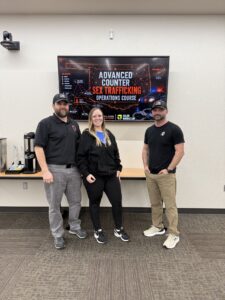
Skull Games Solutions partnered with the Pittsburg County Sheriff’s Office and Oklahoma Attorney General Gentner Drummond’s Human Trafficking Response Unit to deliver Advanced Human Trafficking Training to law enforcement personnel.
Following the training, investigators immediately applied their newly developed skills during an operation focused on identifying potential trafficking victims, targeting suspected traffickers, and reducing the demand for commercial sexual exploitation.
The operation resulted in the arrest of two individuals on allegations of felony solicitation of prostitution and violations of the Oklahoma Computer Crimes Act. One potential trafficking victim was recovered and connected with services, while investigators identified 11 additional potential victims and two suspected traffickers for further investigation.
The operation reinforced the importance of translating classroom instruction into meaningful investigative action.
Operational Results
- 1 potential victim recovered
- 11 additional potential victims identified
- 2 suspected traffickers identified
- 2 buyers arrested
Guthrie, OK – September 10, 2026
Skull Games Solutions once again partnered with the Oklahoma Attorney General’s Human Trafficking Response Unit to provide advanced training and operational support to law enforcement agencies in central Oklahoma.
Participating agencies included the Guthrie Police Department, Jones Police Department, Logan County Sheriff’s Office, and Payne County Sheriff’s Office.
During the intelligence portion of the training, participants identified 15 potential victims and two suspected traffickers for additional investigation. Three potential victims were recovered during the broader effort.
Following the training, participating agencies put their investigative skills into action during a coordinated enforcement operation. The Guthrie Police Department arrested five individuals on allegations of solicitation and violations of the Oklahoma Computer Crimes Act.
These collaborative efforts highlight how intelligence sharing, practical training, and coordinated enforcement can strengthen the ability of law enforcement agencies to identify potential victims and investigate commercial sexual exploitation.
Operational Results
- 3 potential victims recovered
- 15 potential victims identified through intelligence efforts
- 2 suspected traffickers identified for investigation
- 5 buyers arrested
Remote Support:
Beyond its in-person operations, Skull Games Solutions continued providing specialized remote assistance to law enforcement agencies across multiple states. Through advertisement support and intelligence-driven collaboration, SGS helped partner agencies conduct demand reduction operations targeting individuals seeking to purchase commercial sex.
These remote partnerships demonstrate how specialized resources can support law enforcement efforts regardless of geographic location.
Amarillo, TX – September 8, 2026
Skull Games Solutions provided remote advertisement support to the Texas Department of Public Safety during a demand reduction operation in Amarillo, Texas.
The operation focused on individuals seeking to purchase commercial sex, with SGS assisting law enforcement partners through remote operational support.
Operational Results
- 4 buyers arrested
New Castle, DE – September 10, 2026
Skull Games Solutions provided remote advertisement support to the New Castle Police Department during a demand reduction operation targeting individuals seeking to purchase commercial sex.
The coordinated effort resulted in seven buyer arrests and the recovery of one victim, demonstrating how remote investigative support can strengthen law enforcement operations across state lines.
Operational Results
- 1 victim recovered
- 7 buyers arrested
Lubbock, TX – September 23, 2026
Skull Games Solutions continued its partnership with the Texas Department of Public Safety by providing remote support during a demand reduction operation in Lubbock, Texas.
The operation targeted individuals contributing to the demand for commercial sex and resulted in three buyer arrests.
Operational Results
- 3 buyers arrested
Childress, TX – September 25, 2026
Skull Games Solutions supported the Texas Department of Public Safety during a remote demand reduction operation in Childress, Texas.
The operation resulted in three buyer arrests, underscoring the role of remote assistance in supporting enforcement efforts across Texas.
Operational Results
- 3 buyers arrested
Continuing the Mission
Across August and September, Skull Games Solutions continued to show the impact of combining specialized training, actionable intelligence, and strong law enforcement partnerships.
From recovering potential trafficking victims and identifying suspected traffickers to supporting demand reduction operations across multiple states, these collaborative efforts reflect a shared commitment to combating human trafficking and commercial sexual exploitation.
As SGS continues expanding its operational reach, its mission remains unchanged: turning intelligence into action, supporting law enforcement partners, and helping protect vulnerable individuals.

SGX: Expanding the Hunt
By Jeff Tiegs and Tom Phelan
The road eventually disappeared into the jungle. From there, we climbed into a canoe and continued down the Amazon River toward a remote Brazilian village.
It seemed a world away from everything familiar. But something caught our attention.
Cell phones. Internet access. And the same predators exploiting vulnerable people online.
This was precisely what we had come to discover.

Skull Games Expansion with SGX represents the next evolution of our mission: taking our proven I3E model (Identify, Interdict, Innovate, Empower) beyond America’s borders to confront sex trafficking, online exploitation, and other emerging threats.
Brazil offered our first glimpse of just how far this mission could reach.
We began in São Paulo, a sprawling metropolis of more than 20 million people. Its sheer size was staggering. The opportunities to identify predators, uncover networks, and locate victims seemed endless. We could work there forever and barely scratch the surface.
In Brasília, Brazil’s capital, we met government leaders and enthusiastic supporters who recognized the potential of our approach. The relationships necessary to make SGX successful were beginning to take shape.

Then came Belém, the gateway to the Amazon, and our journey into the jungle.
We wanted to know whether our model could work even in the most remote communities.
We found our answer.
Geography no longer protects the vulnerable. Predators can reach into the jungle with nothing more than an internet connection.
And if they can reach those communities, so can we.
Three cities. Three dramatically different environments. One conclusion.
The battlefield has no borders.
Neither should our mission.
Laying the Groundwork
In early September, SGS joined The Sound of Freedom Foundation in Brazil to survey the nature and architecture of human trafficking and exploitation in the country.
But this trip was about more than just understanding the problem. It was about building the relationships necessary to do something about it, and exploring how our proven methodologies can be utilized to combat human trafficking in Brazil.
Throughout the week, we met with lawmakers, law enforcement leaders, prosecutors, influential community leaders, and others committed to confronting human trafficking and organized crime. Those conversations focused on future training, operational collaboration, and strengthening partnerships with those already doing the work on the ground.

At SGS, our approach remains the same wherever we go: we work Through the Skull Games Society, With community leaders and organizations, and By law enforcement partners to identify victims, disrupt criminal networks, and hold traffickers and exploiters accountable.
We’re grateful to our partners at The Sound of Freedom Foundation and to everyone in Brazil who welcomed us, shared their knowledge, and opened doors for what comes next.
SGX. Outthink. Out Maneuver. Out Fight.
Tradecraft: Blocking Ad Trackers on Your Devices
By Tom Phelan
TL;DR: You can filter DNS on your device to block ad and tracker traffic before it connects. Some sites and app features will break, and you need to refresh the list every couple of months
Did you know that the websites and applications we access on a daily basis are often collecting personal details about who and where we are? Technology that is supposed to be about serving us advertisements or improving apps is often selling these personal details to the highest bidder. These technologies include third-party code libraries, called software development kits (SDKs), which advertising and analytics companies use to siphon your data back to their servers.
This article explains how to block those connections. Welcome to my war on AdTech.
Internet users in general should be concerned about advertising technology (AdTech). OSINT analysts even more so, as tradecraft dictates their online footprints should be as few as possible for operational security. One way to do this is to pay for expensive software or devices that make you harder to track. I had another idea to keep my data safe at no cost.
I wondered: what if, when an SDK tried to contact an AdTech server, I simply made sure it couldn’t reach it? If I tell my device not to make connections to the domains the trackers want to go to, it should stop the connections before they are made. Let’s see if it works.

WHO IS TRACKING YOU
Three kinds of companies collect data through apps. An address that starts with sdk. usually belongs to one of them:
- Ad networks decide which ads you see.
- Attribution firms match each app install to the ad that led to it.
- Analytics services record how you use the app.
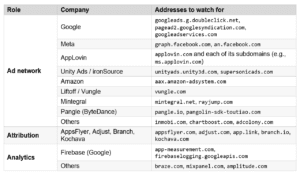
METHOD 1: THE HOSTS FILE
Before your computer asks a DNS server for the address of a domain such as doubleclick.net, it checks the hosts file. If the file lists the domain as 0.0.0.0, the connection fails immediately and no data leaves the machine. It requires no software, subscription, or third-party service.
Each line is an address, a space, and a domain name:

There are no wildcards: blocking applovin.com does not block ms.applovin.com, so each subdomain needs its own line.
Step 1: Download a blocklist
So it turns out there are a ton of these domains, way too many to do by hand. I found that someone with the same idea maintains a list: StevenBlack/hosts on GitHub. More than 75,000 ad, tracking, and malware domains ready to go. Start with the base list because the social-media variant will likely break sites like Facebook and Instagram entirely.
https://raw.githubusercontent.com/StevenBlack/hosts/master/hosts
Step 2: Install it and keep a backup
Windows:
- Press Start, type Notepad, right-click it, and choose Run as administrator.
- File › Open C:\Windows\System32\drivers\etc, set the file type to All Files, and open hosts.
- File › Save As backup (file type All Files) as a backup, then reopen hosts.
- Paste the blocklist below the existing lines and save. Check it saved as hosts, not txt.
- In an administrator Command Prompt, run ipconfig /flushdns.
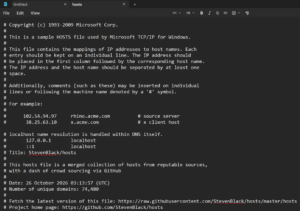
If Windows Defender raises a “HostsFileHijack” alarm, choose Allow on device. It flags this file because malware edits it too, and otherwise it will reset the file.
Mac – the list already includes the localhost lines a Mac needs. Open Terminal and run these one at a time (your password won’t show as you type); they back up your file, download the list, install it, and flush the cache:

Linux – back up 

Step 3: Confirm it works
Run ping googleads.g.doubleclick.net. If it replies from 0.0.0.0 or says it could not find the host, the block is live.
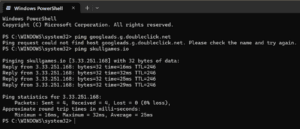
IT WORKS!
The first lookup after saving can hang for a few minutes while Windows loads the new list. Don’t test with nslookup: it skips the hosts file and will show the real address.
Step 4: Keep it up to date
Add a domain: to block a new sdk. address, add a line for it (domain only, no https://), save, and flush.
Remove a block: if a site breaks, put a # in front of its line, save, and flush.
Refresh: trackers change domains often, so re-download the list every month or two. On Windows, replace the old blocklist below your original lines. On a Mac, rerun only the last three commands; the first would overwrite your backup.
Undo everything: copy your backup over hosts and flush.
METHOD 2: FILTERING DNS
Instead of maintaining a list yourself, you can point your device at a filtering DNS server, such as the free AdGuard DNS, which refuses to look up known tracker domains. You get less control, but almost no maintenance. Set both the IPv4 and IPv6 addresses; if you set only IPv4, devices on IPv6-capable networks can route around the filter:

Windows:
- Settings › Network & internet › Wi-Fi (or Ethernet) › Hardware properties, then click Edit next to DNS server assignment and choose Manual.
- Turn on IPv4 and IPv6 and enter the addresses above.
- Set DNS over HTTPS to On (automatic template) for the IPv4 addresses; Windows fills in AdGuard’s template on its own. For the IPv6 pair it left the template blank on my laptop, so choose On (manual template) there and enter https://dns.adguard-dns.com/dns-query. Leave Fallback to plaintext off, and save.
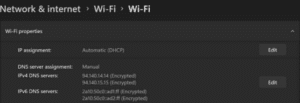
Mac – System Settings › Network › Wi-Fi › Details › DNS: remove the existing entries, click + to add all four addresses, and click OK.
Your whole network – enter the same addresses in your router’s DNS settings (usually under WAN, Internet, or DHCP; the IPv6 pair often sits on a separate IPv6 page). Every device on your Wi-Fi, phones and smart TVs included, is then covered. For full control at home, a Pi-hole on a small spare computer does the same job with a dashboard showing every blocked call.
The two methods stack. Run the hosts file on your computer and filtering DNS on your router, and anything that slips past one usually meets the other.
BROWSER EXTENSIONS
Your browser needs its own blocker, because some ads arrive from the same servers as the page itself. On YouTube, the ads and the videos share an address, so blocking one would block both. uBlock Origin handles this by inspecting what loads inside the page. Install it free in Firefox. In Chrome, the full version is no longer supported, and Edge is phasing it out by the end of 2026, so use uBlock Origin Lite there.
Note: browsers have their own “secure DNS” setting that can quietly route around your system choices. If blocked domains still load, check Chrome (Settings › Privacy and security › Security › Use secure DNS), Edge (Settings › Privacy, search, and services › Security), and Firefox (Settings › Privacy & Security › DNS over HTTPS). Turn it off, or point it at the same filtering provider.
PHONES
Phones don’t let you edit a hosts file, so filtering DNS is the main option. Phones also carry the most SDK traffic.
iPhone
- Install a DNS blocker such as NextDNS, AdGuard Pro, or Lockdown Privacy. Each installs a profile that filters every app at once.
- Settings › Privacy & Security › Tracking: turn off Allow Apps to Request to Track.
- Settings › Privacy & Security › Apple Advertising: turn off Personalized Ads.
- Settings › your name › iCloud › Private Relay (iCloud+ only): masks your IP address in Safari. It doesn’t block ads, but it makes you harder to track across sites.
- Settings › Privacy & Security › App Privacy Report: turn it on and check back in a week to see who each app has been calling.
Android
Settings › Network & internet › Private DNS (on Samsung: Settings › Connections › More connection settings › Private DNS). Choose “Private DNS provider hostname” and enter dns.adguard-dns.com. This applies to the whole phone; no app is required.
On either phone, a VPN that sets its own DNS will override your blocker unless the VPN is the blocker.
FUNCTION CHECK
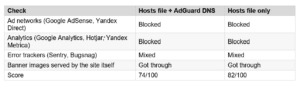
You can see if you’re winning your own war on AdTech with tester sites. I loaded an ad-blocking test page (adblock-tester.com) in a browser with no ad-blocking extension, once with both layers on and once with the hosts file alone:
Protect your privacy, especially if you are doing OSINT. You are not a product!
Upcoming Events
- Task Force Expedition XXI | November 7 – 8 | Austin, TX
Skull Games Links
- Social Media: Follow Us Linkedin Facebook Insta Twitter
- Donations: Support Us
- Law Enforcement: Partner With Us
- Volunteer: Join Us
- Those interested in learning more or supporting the mission can also contact Lauren Norris at lauren@skullgames.org.
About the Author

Tom Phelan is an active-duty U.S. Army Intelligence Officer with over five years of experience in OSINT and a dedicated volunteer for Skull Games Task Force.

Olinda Cardenas is a former crime scene investigator turned cybercrime enthusiast. She specializes in OSINT and financial crime investigations and is a dedicated volunteer with Skull Games