

In This Issue
Training and Operations: Successful Missions in Kansas and Oklahoma
OSINT Tradecraft: Geolocation Manipulation
Who We Are
The Skull Games Task Force employs Open Source Intelligence to IDENTIFY sexual predators and their victims, enabling law enforcement to INTERDICT the cycle of abuse. Our mission is to liberate survivors and EMPOWER them with the opportunity for a life of hope, healing, and freedom. The Task Force provides direct support to law enforcement through small teams or as a massive expedition, bringing together the collective capability of more than 400 elite volunteers. This counter-sexual exploitation offensive leverages considerable expertise and resources to fight human trafficking and sexual exploitation. With us as the HUNTERS, we get into the heads of predators, in our own “SKULL GAME”…
April Operations
by Olinda Cardenas
- Predators and Victims Identified: 48
- Predators Arrested: 20
- Individuals Trained in Countertrafficking: 50
In April, Skull Games Solutions (SGS) continued supporting intelligence-led counter-human trafficking operations and training across multiple jurisdictions, with a focus on victim recovery, trafficker identification, and demand reduction.
On April 4, SGS provided remote support for an operation in Park City, Kansas, alongside partners including the Bureau of Indian Affairs. The operation resulted in:
- Six (6) victims recovered
- Eight (8) buyers were arrested
- Two (2) traffickers were arrested
This effort reinforced the impact of coordinated targeting, victim-centered support, and actionable intelligence in disrupting exploitation.
Later in the month, SGS was in Woodward, Oklahoma, standing shoulder to shoulder with Oklahoma Attorney General Gentner Drummond’s Office to deliver Advanced Human Trafficking Training. Representatives from Woodward Police Department, Federal Bureau of Investigations, Bureau of Indian Affairs, Dewey County Sheriff’s Office, Ellis County Sheriff’s Office, Woodward County Sheriff’s Office, Oklahoma Department of Corrections, Washita County Sheriff’s Office, District 26 District Attorney’s Office, and Alva Police Department came together with one mission: to protect the vulnerable and pursue those who exploit them.
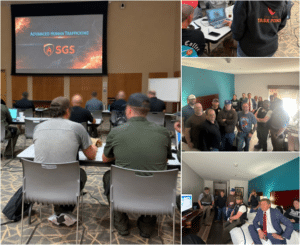
This training goes far beyond explaining what human trafficking is. It focused on how to identify, disrupt, and directly target offenders using Open-Source Intelligence. During the course, multiple victims and traffickers were identified across Oklahoma through OSINT.
Across both efforts, SGS supported victim recovery, trafficker targeting, on-site operational support, remote intelligence support, and demand reduction efforts. The outcomes from April reflect what happens when agencies train together, share intelligence, and move with purpose.
OSINT Tradecraft: Geolocation Manipulation
by Tom Phelan
Today, we are covering how to fake your geolocation and detect fake location data. Location data—whether pulled from a geolocated social media post or metadata attached to an image—can mistakenly be treated as definitive evidence in an investigation. However, location data is fairly easy to manipulate, either via a VPN or by downloading an app. I’m not entirely sure what to call this technique. I’ve seen it called “faking” in most app names, “mocking” in device settings, and “spoofing” as well. Spoofing seems apt, but in reality, it is a very specific practice that involves broadcasting false Global Navigation Satellite System (GNSS) radio frequencies to deceive a receiver into calculating an incorrect position. This is inward, intentionally manipulating your own location. For consistency, I will call the verb “location faking” and the object “mock location”.
How to Fake Your Location
On a desktop device, the easiest way to do this is to download a VPN and change your location, which, as an intelligence or cybersecurity professional, you should always be doing anyway. From a tradecraft perspective, VPN’s have some limitations. VPNs usually have a limited number of Points of Presence, or locations the VPN can make your device appear to be, typically tied to the provider’s data centers. Ideally, faking your location would let you set it to any point on Earth. On an Android device (or emulator), this is easy, effective, and usually free. Android includes a built-in capability for mock location data, originally intended to help software developers test location-based applications. As an example, I will run through how to fake a location on Android in 5 steps.
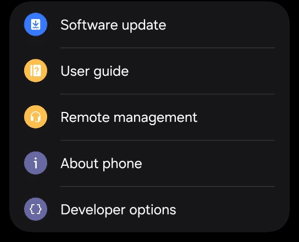
STEP 1: Activate the device’s hidden developer menu
Go to Settings > About Phone > Software Information > tap Build Number 7 times to activate Developer Options (a pop-up will confirm it worked). Then you’ll see the Developer Options under your About phone in Settings.
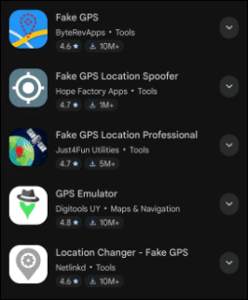
STEP 2: Download a GPS Faking App
Go to an app store like Google Play and search for something like “Fake GPS Location.” I saw around 15 under that search and downloaded the first one, Fake GPS by ByteRevApps.
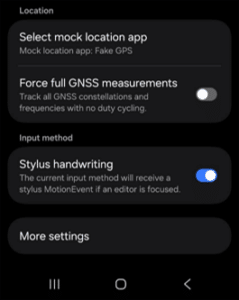
STEP 3: Assign the Mock Location App
In the newly unlocked Developer Options, navigate to the location settings, find the option labeled “Select mock location app,” and select the downloaded utility from the list.
STEP 4: Location Selection
Opening the faking application allows you to select any coordinate on a digital map. Activating the “Play” function forces the phone to transmit the simulated coordinates to all system-wide applications. I tested by changing my location to good ol’ Tampa, Florida.
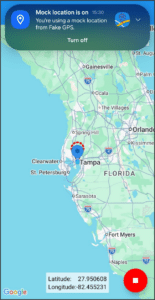
STEP 5: Test
Always test to make sure your VPN or Faking App actually has you as being in the required locale. I tested by opening Google Maps. Sure enough, there I was with an accurate geolocation in an inaccurate geolocation, if that makes sense. It also forced all my other apps to change location settings, like my time zone (annoying). But Android System Settings will notify you that the mock location is on, with a button to quickly turn it off.

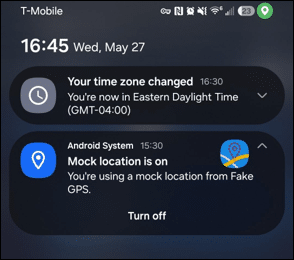
This is a quick and easy rundown example, but experience will vary by device used and the level of data manipulation you are attempting. Unlike Android, Apple does not include a consumer-accessible “mock location” toggle in iOS settings. Unless jailbroken, iOS passes a flag to the app if you’re using a faked GPS. Consequently, altering an iPhone or iPad’s location typically requires tethering the mobile device to a desktop computer running specialized software.
Counter Measures
You now know how to use this technique for operational security while conducting OSINT. But how can you still be identified, or what if a malicious actor is using this technique? Faking a GPS location only alters the GPS data as it appears to the device software, not the internet or cellular routing data. An IoT device may also use GPS, Wi-Fi networks, cell towers, and other telemetry data. Network operators can still approximate a device’s true location via cell tower triangulation, meaning software-level faking is generally only effective against consumer-facing mobile applications rather than cellular infrastructure providers.
But how can we identify this technique in use? Devices do not rely solely on GPS to determine location; they fuse data from sources such as Wi-Fi access point MAC addresses (BSSIDs) and Bluetooth Low Energy (BLE) beacons. So, if you have other device information and can find Wi-Fi BSSIDs indexed in databases like Wigle.net, you may find an unmanipulated location. Next, you can try to identify VPNs or mock locations through IP reputation checks against known VPN and datacenter databases such as IPQualityScore, ASN (Autonomous System Number — essentially the unique identifier for a network operator or ISP) analysis, and flags distinguishing residential versus datacenter IPs.
Behavioral red flags include rapid IP changes, unrealistic travel speeds between locations, timezone or locale mismatches with the reported IP, and high latency patterns, while deeper traffic analysis may reveal DNS leaks, common VPN ports, WebRTC exposures, or encryption signatures. Browser and device fingerprinting adds another layer by identifying the same hardware/software signatures across geographically inconsistent IPs.
Enterprise solutions like Incognia or Appdome can help detect inconsistencies with a subscription. The Play Store apps that detect mock locations only detect mock location data on your device, which limits their use cases. In some cases, you may be able to honeypot the person of interest with services like Grabify, which lets you wrap a legitimate URL in a tracking link that logs the clicker’s real IP, ASN, device/OS details, and approximate location upon access. Similarly, Canarytokens.org generates bait files (Word docs, PDFs, 1×1 images) that trigger silent alerts when opened. However, honeypots carry some risk, as technically savvy targets may recognize suspicious links or files and potentially trace them back to you if you are not using proper OPSEC. The strongest detection strategy layers these techniques with historical pattern analysis rather than depending on any single source.
Upcoming Events
- Task Force Expedition XX | August 8 – 9 | Gainesville, VA
- Task Force Expedition XXI | November 7 – 8 | Austin, TX
Skull Games Links
- Social Media: Follow Us Linkedin Facebook Insta Twitter
- Donations: Support Us
- Law Enforcement: Partner With Us
- Volunteer: Join Us
About the Author

Tom Phelan is an active-duty U.S. Army Intelligence Officer with over five years of experience in OSINT and a dedicated volunteer for Skull Games Task Force.

Olinda Cardenas is a former crime scene investigator turned cybercrime enthusiast. She specializes in OSINT and financial crime investigations and is a dedicated volunteer with Skull Games